Debugger Support
Currently, Boost.Decimal supports pretty printing with LLDB, GDB, and the Visual Studio debugger. All three produce the same text for a given value.
LLDB
To load the pretty printer, add the following line to your .lldbinit:
command script import /path/to/decimal/extra/decimal_printer_lldb.pyGDB
To load the pretty printer, add the following line to your .gdbinit:
source /path/to/decimal/extra/decimal_printer_gdb.pyor you can source it manually in GDB:
(gdb) source /path/to/decimal/extra/decimal_printer_gdb.pyVisual Studio (NATVIS)
A decimal encoding can not be decoded by the NATVIS expression evaluator on its own, so the
visualizer delegates to a small helper DLL that reads the value out of the process being
debugged and formats it with the library’s own to_chars.
That keeps the Visual Studio display in agreement with the LLDB and GDB printers.
Building the helper DLL
Run extra/decimal_printer_msvc.bat from a machine with Visual Studio installed.
It builds decimal_printer_msvc.dll next to the batch file.
The DLL is loaded by the debugger itself, so it is always built for the debugger’s
architecture rather than the architecture of the program being debugged.
Registering the visualizer
Register extra/decimal_printer_msvc.natvis in any of the usual ways, and keep
decimal_printer_msvc.dll beside it so the debugger can load it.
Add the .natvis file to your Visual Studio project.
In Solution Explorer, right-click the project, select Add > Existing Item, and choose
decimal_printer_msvc.natvis.
Alternatively copy both files to your per-user Visualizers directory, replacing 2022 with
your Visual Studio version:
%USERPROFILE%\Documents\Visual Studio 2022\Visualizers\For a CMake project, add the .natvis file as a source file:
target_sources(my_target PRIVATE /path/to/decimal/extra/decimal_printer_msvc.natvis)If the debugger shows an error in place of the value, the DLL could not be loaded.
Placing it in a directory on the system PATH resolves that.
Example
Once you have loaded a pretty printer, you can run the below example to see how different values are represented with the pretty printer. The expected output of the example below was taken from LLDB. GDB and the Visual Studio debugger render the same text, so only the surrounding presentation differs.
// Copyright 2025 Matt Borland
// Distributed under the Boost Software License, Version 1.0.
// https://www.boost.org/LICENSE_1_0.txt
//
// This example, when run with the pretty printers, shows how various values are represented

#include <boost/decimal/decimal32_t.hpp>        // For type decimal32_t
#include <boost/decimal/decimal64_t.hpp>        // For type decimal64_t
#include <boost/decimal/decimal128_t.hpp>       // For type decimal128_t
#include <boost/decimal/decimal_fast32_t.hpp>   // For type decimal_fast32_t
#include <boost/decimal/cmath.hpp>              // For nan function to write payload to nans
#include <limits>

template <typename T>
void debug_values()
{
    // Displays the maximum and minimum values that the type can hold
    // from numeric_limits
    const T max {std::numeric_limits<T>::max()};
    const T min {std::numeric_limits<T>::min()};

    // A number whose representation will change based on IEEE vs fast type
    // In the IEEE case 3.140e+00 will be displayed as the pretty printer is cohort preserving
    const T short_num {"3.140"};

    // Shows how infinities will be displayed
    const T pos_inf {std::numeric_limits<T>::infinity()};
    const T neg_inf {-std::numeric_limits<T>::infinity()};

    // Shows how the different kinds of NANs will be displayed
    const T qnan {std::numeric_limits<T>::quiet_NaN()};
    const T snan {std::numeric_limits<T>::signaling_NaN()};

    // Shows how a payload added to a QNAN will be displayed
    const T payload_nan {boost::decimal::nan<T>("7")};

    // Break Here:
    static_cast<void>(max);
    static_cast<void>(min);
    static_cast<void>(short_num);
    static_cast<void>(pos_inf);
    static_cast<void>(neg_inf);
    static_cast<void>(qnan);
    static_cast<void>(snan);
    static_cast<void>(payload_nan);
}

int main()
{
    debug_values<boost::decimal::decimal32_t>();
    debug_values<boost::decimal::decimal64_t>();
    debug_values<boost::decimal::decimal128_t>();

    debug_values<boost::decimal::decimal_fast32_t>();
    debug_values<boost::decimal::decimal_fast64_t>();
    debug_values<boost::decimal::decimal_fast128_t>();

    return 0;
}
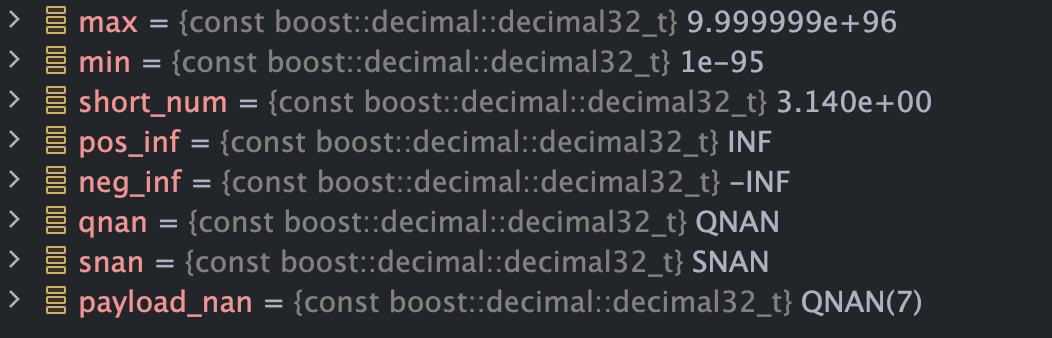
Expected Output for T = decimal32_t:
Expected Output for T = decimal_fast32_t:
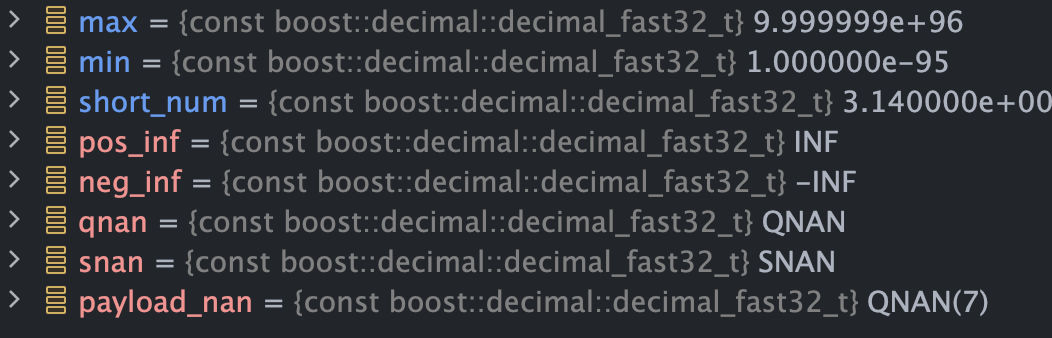
The reason for the difference in how decimal32_t and decimal_fast32_t is displayed is due to Cohorts and Normalization
-
decimal32_t,decimal64_tanddecimal128_tdebuggers are cohort preserving -
decimal_fast32_t,decimal_fast64_tanddecimal_fast128_tdebuggers are always normalized